THE RISE COLLECTION
THE RISE COLLECTION

BR4KE

Owner's Manual
BR4KE brand art
BR4KE iconiPhone with iOS 17 or later, and Android
BR4KEWhat It Does

What It Does

BR4KE finds car meets, cars and coffee, car shows and cruise-ins near you. It is the redlightcam car meet directory, built for your phone. It lists every upcoming meet we track, gets you there with directions inside the app and reminds you before it starts.
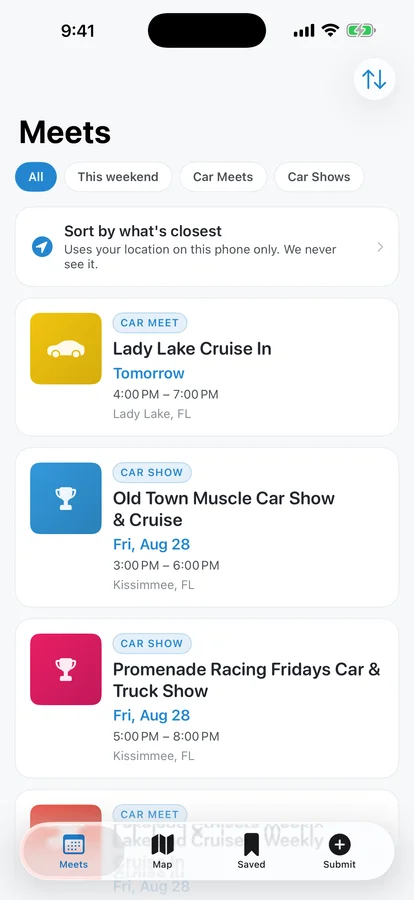
The Meets tab with filters for All, This weekend, Car Meets and Car Shows, and a list of upcoming meets
BR4KESetup

Setup

  1. Download BR4KE free from the App Store or Google Play.
  2. Open it. There is no account and no sign-in, and it asks for nothing at launch.
  3. Tap Sort by what's closest on the Meets tab and allow location to see the nearest meets first. Your location stays on your phone.
BR4KEFinding A Meet

Finding A Meet

  1. On the Meets tab, pick All, This weekend, Car Meets or Car Shows.
  2. Tap the sort button at the top to switch between Soonest and Nearest.
  3. Tap any meet to see when it starts, where it is and how often it repeats.
BR4KEThe Meet Page

The Meet Page

Each meet shows its day and time, how often it repeats and where it is. Tap Get directions, Save, Add to calendar or Copy link. A recurring meet goes on your calendar as a repeating entry. Look for the Happening now and Recurring tags.
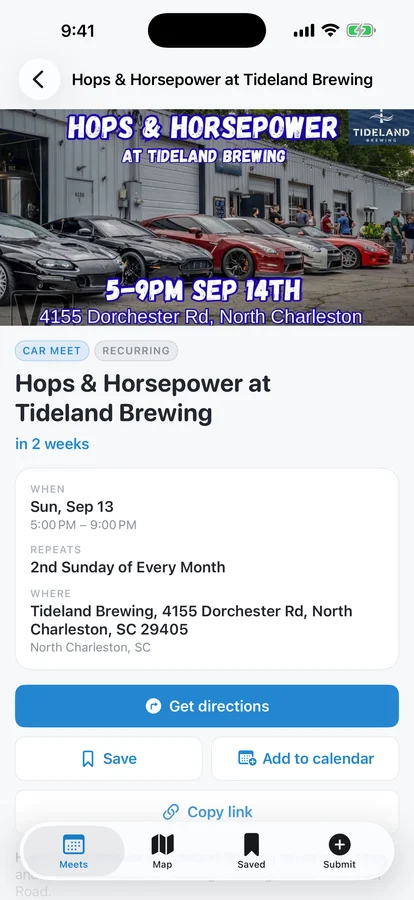
A meet page for Hops and Horsepower at Tideland Brewing with Get directions, Save and Add to calendar
BR4KEDirections And The Map

Directions And The Map

Get directions draws a driving route on the Map tab with a turn list underneath, so you never leave the app. Pick a route and tap Start. Switch the map between Near Me and Coverage at the top.
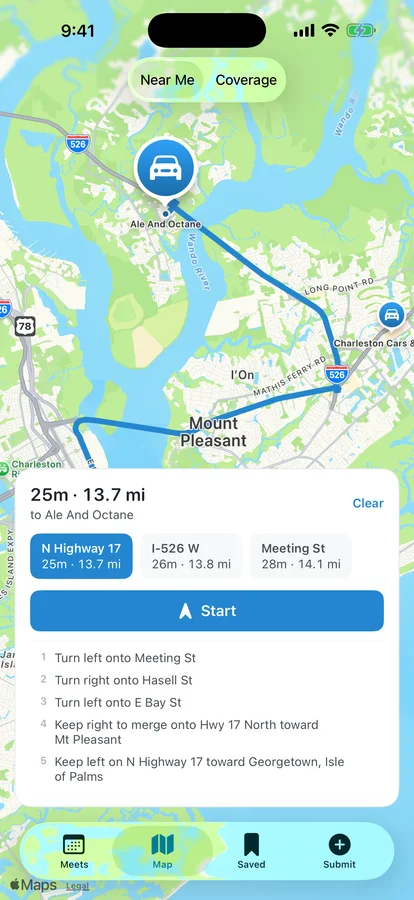
The Map tab with a driving route to a meet, three route choices, a Start button and the turn list
BR4KESaved Meets And Alerts

Saved Meets And Alerts

  1. Tap Save on a meet. It shows up on the Saved tab.
  2. Turn on Remind me 2 hours before to get a reminder before each saved meet starts.
  3. On iPhone, turn on Tell me when I drive past one to hear about a meet happening now when you pass within about 300 meters. It needs background location.
BR4KECoverage And Submit

Coverage And Submit

  1. Switch the map to Coverage to see every state with meets and the ones we do not cover yet.
  2. Tap an empty state, or the Submit tab, to tell us about a meet.
  3. Fill in the name, place and time, then tap Send it in. We check it and add it to redlightcam.co, usually within a few days.
BR4KETroubleshooting

Troubleshooting

A meet has the wrong date, time or place.
Tap Report an issue with this meet at the bottom of its page. Pick what is wrong, add details and tap Send report. We check it and fix the listing.
My filter shows no meets.
Tap Show all, or try another filter.
The list will not load.
Check your connection and tap Try again.
It says calendar access is off.
Turn on calendar access for BR4KE in Settings, then tap Add to calendar again.
Sending a new meet failed.
Tap Email it to us instead. Mail opens with everything you typed already filled in.

Support

Supporttherisecollection.co/portfolio/br4ke

CreditsMade by THE RISE COLLECTION. Meet data from redlightcam.co.

StoreFree on the App Store and Google Play.

NoteNo account, no tracking and no analytics. Your location never leaves your phone.

THE RISE COLLECTION